MultiSet Developer Docs
Introduction
In this guide, you'll embark on an exciting journey to build your first application using the innovative MultiSet feature, enhanced with 3D mapping and a Visual Positioning System (VPS). By leveraging these advanced technologies, your app can deliver a more immersive and interactive user experience.
Getting Started with MultiSet
The MultiSet developer documentation is your essential resource for creating and integrating MultiSet features into your application. This comprehensive guide will walk you through the processes of utilizing our robust APIs, SDKs, and AI Plugins. By following this documentation, you'll understand how to effectively harness these tools, paving the way for a seamless integration of cutting-edge functionalities.
The MultiSet Unity SDK is designed for creating immersive, large-scale, location-based experiences. It extends Unity's AR Foundation subsystems, allowing developers to seamlessly mix and match MultiSet's SDK features with Unity's existing AR framework. Any existing AR Foundation project can be upgraded with the MultiSet SDK. Developers can use the Unity documentation and tutorials on AR Foundation for basic AR concepts and then extend them to make use of MultiSet's powerful features.
MultiSet Features
Large-Scale VPS: Our Visual Positioning System (VPS) scales to spaces over 100,000 sq ft, perfect for large, location-based experiences.
Map Stitching: Merge multiple maps using MapSet to cover even larger and more complex areas seamlessly.
Standardized Localization: Delivers standard localization output in WGS 84 and GeoPose formats for universal compatibility.
Robust Precision: Achieve centimeter-precise VPS performance even in challenging conditions with dynamic lighting and environmental changes.
Third-Party Scan Integration: Easily use existing scans from Matterport (MatterPak, E57) and other scanners that support E57 files (e.g., Leica RTC 360, BLK 360, NavVis).
Object Tracking: Anchor and track 3D objects in the real world using any GLB file with our Object Tracking feature.
Cross-Platform SDKs: Build your applications with comprehensive SDKs for Unity, WebXR, and native iOS and Android.
Shared AR Experiences: Enable multiplayer and shared AR experiences with a unified coordinate system, allowing users to interact in the same digital space.
Platform Architecture
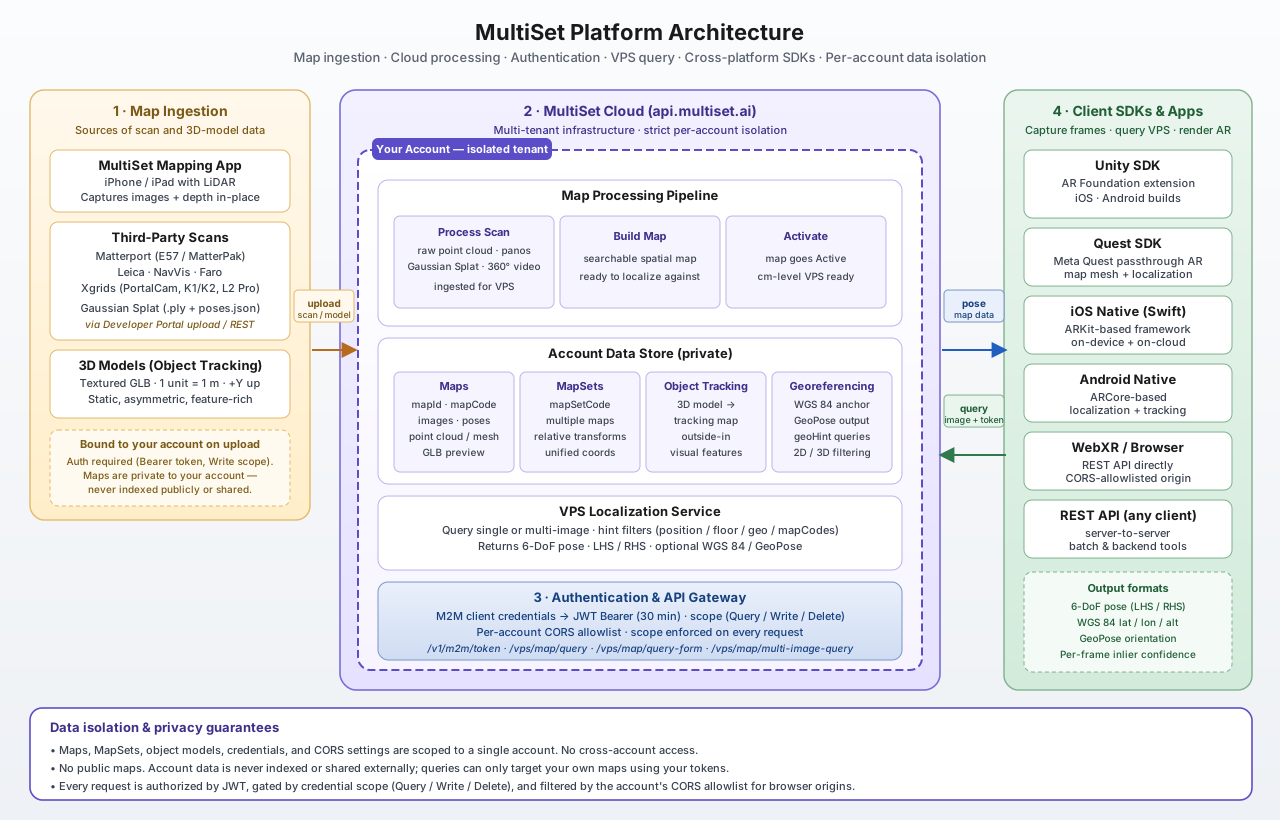
MultiSet is an end-to-end VPS platform: scans go in on one side, 6-DoF pose comes out on the other, and everything in between runs in your account-isolated tenant on the MultiSet Cloud. The diagram below shows the four stages — map ingestion, cloud processing, authentication, and VPS query from the SDK — and how data is kept private to your account at every step.
How the pieces fit together
Map ingestion. You bring spatial data into the platform from the MultiSet Mapping App (LiDAR iPhone / iPad), from third-party scanners (Matterport, Leica, NavVis, Faro, Xgrids), or from a Gaussian Splat. For Object Tracking, you upload a textured GLB. Every upload is authenticated and bound to your account.
Cloud processing. The cloud processes your scan and prepares a VPS-ready map. When processing finishes, the map's status moves to Active and is ready to be queried. Multiple maps can be combined into a MapSet for large venues, and any map can be georeferenced to WGS 84 for GeoPose output.
Authentication. All access is gated by client credentials: you exchange a
clientId+clientSecretfor a short-lived JWT Bearer token via/v1/m2m/token. Every API request is checked for signature, expiry, scope (Query / Write / Delete), and CORS origin — see the full flow in Authentication.VPS query. A device captures one or more frames and sends them to the Map Query endpoint (directly via REST or through one of the SDKs). Localization parameters like
hintPosition,hintFloorHeight,geoHint, andhintMapCodesnarrow the search before image retrieval runs. The response is a centimeter-precise 6-DoF pose, optionally returned in WGS 84 / GeoPose form.
Data isolation & privacy
MultiSet is a multi-tenant platform with strict per-account isolation:
Per-account scope. Maps, MapSets, object-tracking models, credentials, and CORS settings live inside a single account. There is no concept of cross-account access — your tokens can only see and query your own data.
No public maps. Account data is never indexed, shared, or exposed to other developers. Maps are not discoverable outside your account, and there is no shared "world map."
Authorization on every request. Every API call is verified by JWT, gated by the credential's scope, and filtered by your account's CORS allowlist for browser origins. A read-only credential cannot write or delete, even with a valid token.
Credential hygiene. Client secrets are shown once at creation, can be rotated or deactivated at any time, and are intended to be stored in environment variables or a secrets manager — never embedded in client-side code.

Last updated
