> For the complete documentation index, see [llms.txt](https://docs.multiset.ai/llms.txt). Markdown versions of documentation pages are available by appending `.md` to page URLs; this page is available as [Markdown](https://docs.multiset.ai/fundamentals/localization/hint-radius.md).
# HintRadius
Control the search radius around hintPosition or geoHint to tune the localization search scope
### Overview
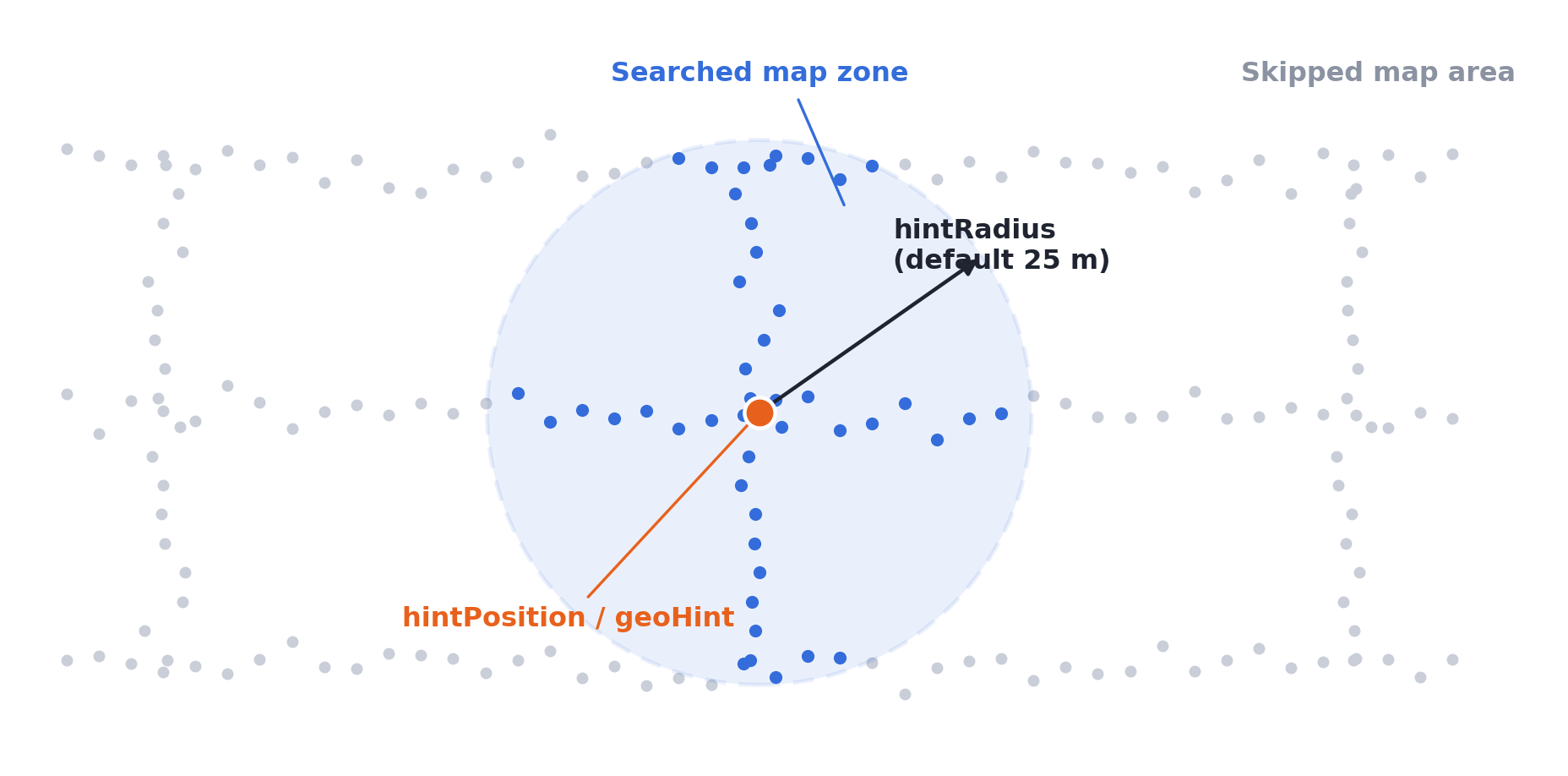
`hintRadius` sets the search radius, in meters, that the VPS uses around a spatial hint. When your localization query includes a `hintPosition` or a `geoHint`, the retrieval phase only searches the portion of the map within `hintRadius` meters of that point. The default is **25 m**, and the value can range from **5 to 100**.
A smaller radius gives faster queries and fewer mismatches in visually similar areas, but requires a more accurate prior. A larger radius is more forgiving when the hint itself is uncertain.
{% hint style="warning" %}
`hintRadius` only applies when `hintPosition` or `geoHint` is provided in the same query. On its own it has no reference point and no effect.
{% endhint %}
### How It Works
Localization runs in two phases: image retrieval first, then pose estimation. Spatial hints narrow the retrieval phase, and `hintRadius` controls how aggressively:
1. The hint (`hintPosition` in map-local coordinates, or `geoHint` converted from GPS) defines a center point.
2. Only the map portion within `hintRadius` meters of that point is kept as the search area.
3. Visual matching then runs against the selected map zone only.
Only the map zone within hintRadius of the hint point is searched; the rest of the map is skipped.
If `use2DFiltering` is enabled with a `geoHint`, the radius check ignores the Y-axis (altitude) and uses only horizontal distance (X and Z).
### Parameter Format
| Endpoint type | Format | Example |
| --------------------------------------------------------------- | -------------- | -------------------- |
| JSON body (`/vps/map/query`) | Number | `"hintRadius": 15` |
| Form-data (`/vps/map/query-form`, `/vps/map/multi-image-query`) | Numeric string | `"hintRadius": "15"` |
| Range | Default |
| ------- | ------- |
| 5–100 m | 25 m |
Values outside the range are clamped to 5–100 by the SDKs. Works for both single Maps and MapSets.
***
### Choosing a Radius
Match the radius to the accuracy of whatever produced the hint:
| Hint source | Suggested radius |
| ---------------------------------------------- | ---------------- |
| Previous localization result (device tracking) | 5–15 m |
| QR code or known start point | 5–10 m |
| BLE beacon / WiFi positioning | 10–25 m |
| Outdoor GPS (`geoHint`) | 25–50 m |
| Low-accuracy GPS (urban canyon, near windows) | 50–100 m |
If localization starts failing with a tight radius, the hint is probably drifting outside the search area: widen the radius or refresh the hint.
***
### Examples
```json
// Tight radius around a previous localization result (JSON body)
{
"hintPosition": [12.5, 2.0, -7.3],
"hintRadius": 10
}
// GPS hint with a wider radius and 2D filtering (JSON body)
{
"geoHint": [37.7749, -122.4194, 10.0],
"hintRadius": 50,
"use2DFiltering": true
}
// Form-data endpoint, pass as strings
"hintPosition": "[12.5, 2.0, -7.3]"
"hintRadius": "10"
```
***
### SDK Support
`hintRadius` is exposed in all MultiSet SDKs alongside the hint parameters:
* **Unity SDK / Quest SDK**: `hintRadius` (int) on `MapLocalizationManager` and `SingleFrameLocalizationManager`
* **Android Native**: `LocalizationConfig.hintRadius`
* **iOS Native**: `MultisetConfig` hint settings
* **WebXR SDK**: `hintRadius` in the localization options
***
### Best Practices
* Always pair `hintRadius` with `hintPosition` or `geoHint`. Sent alone, it is ignored by the server, and some SDKs skip sending it entirely.
* Start with the default 25 m and tighten it only once your hint source has proven reliable.
* Update the hint frequently when the user is moving, a stale hint with a tight radius can exclude the user's true position from the search area.
* For multi-floor buildings, combine with [`hintFloorHeight`](/fundamentals/localization/hint-floor-height.md) to constrain the vertical range, since a 25 m sphere can span several floors.
* To read map-local coordinates for `hintPosition` directly off the mesh, see [Find Hint Coordinates](/workflow/guides/find-hint-coordinates.md).
---
# Agent Instructions
This documentation is published with GitBook. GitBook is the documentation platform designed so that both humans and AI agents can read, navigate, and reason over technical content effectively. Learn more at gitbook.com.
## Querying This Documentation
If you need additional information that is not directly available in this page, you can query the documentation dynamically by asking a question.
Perform an HTTP GET request on the current page URL with the `ask` query parameter, and the optional `goal` query parameter:
```
GET https://docs.multiset.ai/fundamentals/localization/hint-radius.md?ask=&goal=
```
`ask` is the immediate question: it should be specific, self-contained, and written in natural language.
`goal` is optional and describes the broader end goal you are ultimately trying to accomplish on behalf of the user. GitBook uses it to tailor the answer towards what is most useful for that goal.
The response will contain a direct answer to the question and relevant excerpts and sources from the documentation.
Use this mechanism when the answer is not explicitly present in the current page, you need clarification or additional context, or you want to retrieve related documentation sections.